.svg)
The assortment planning software to protect sales and margin
Decide which products are active in which stores, then let that range drive what gets ordered. Flowlity connects your store assortment to AI replenishment in one system, so out-of-range products stop generating orders.
Get a Demo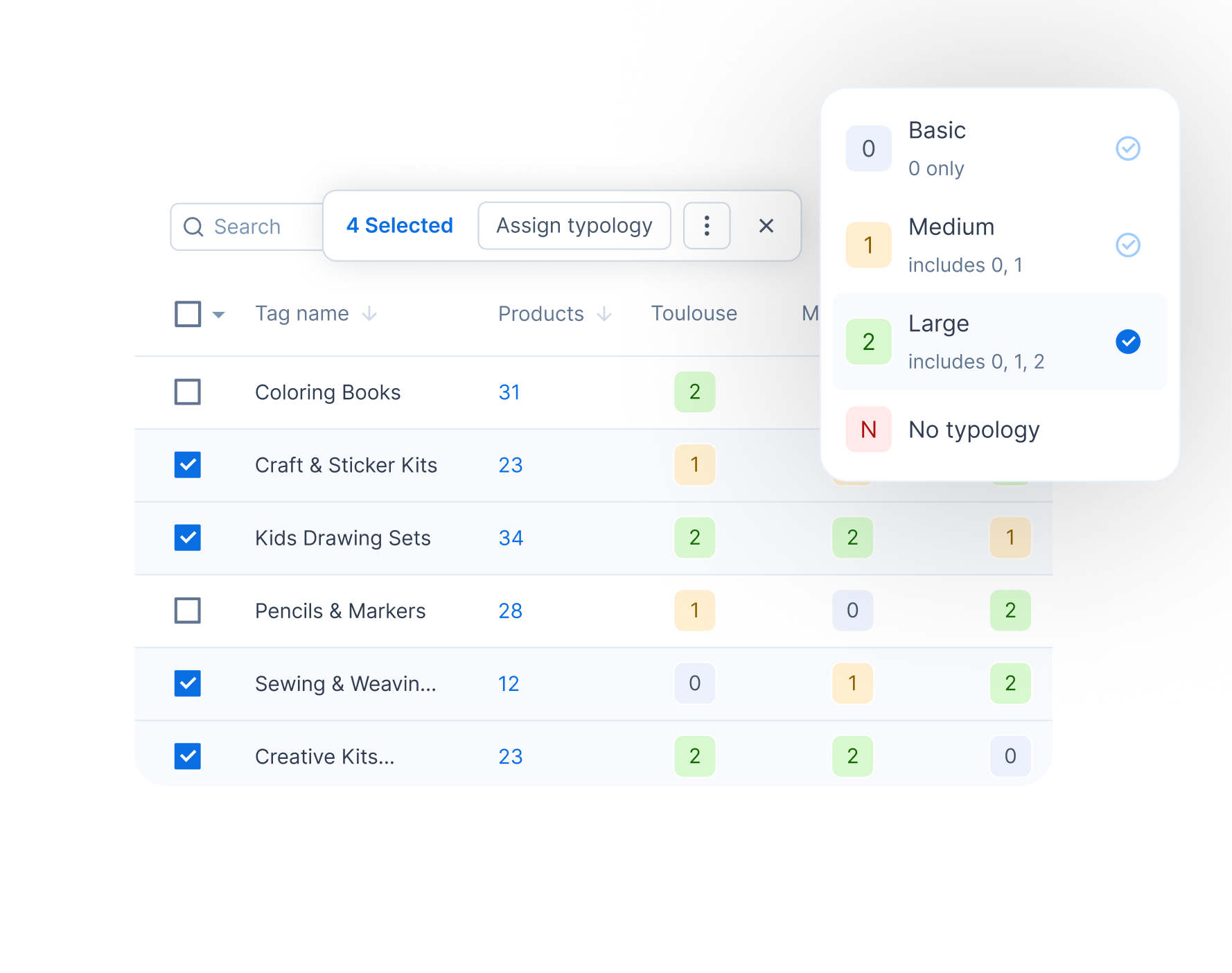
Build the right range for every store
Set which products belong where, and let the system keep it true.
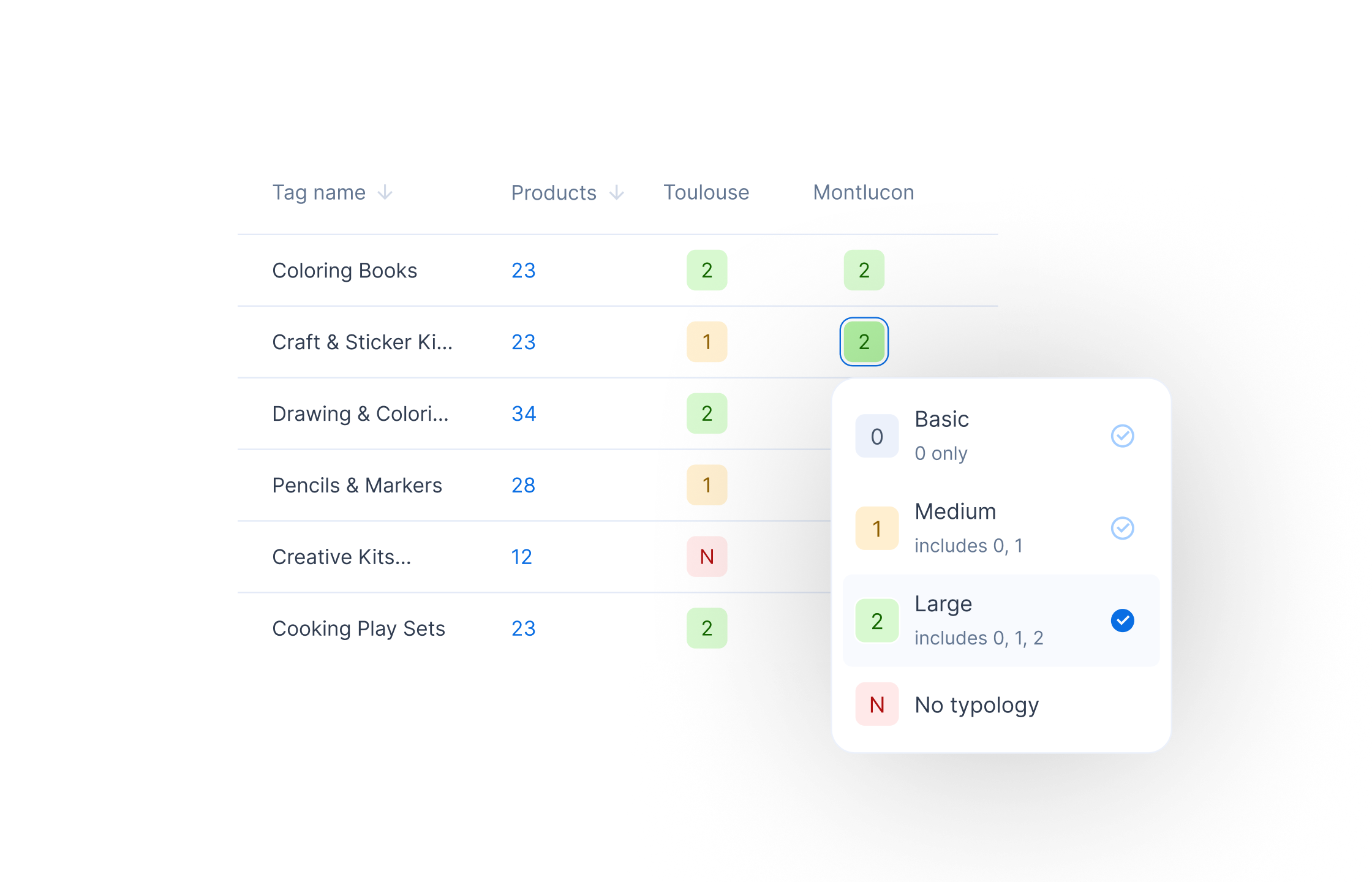
Typology-based activation
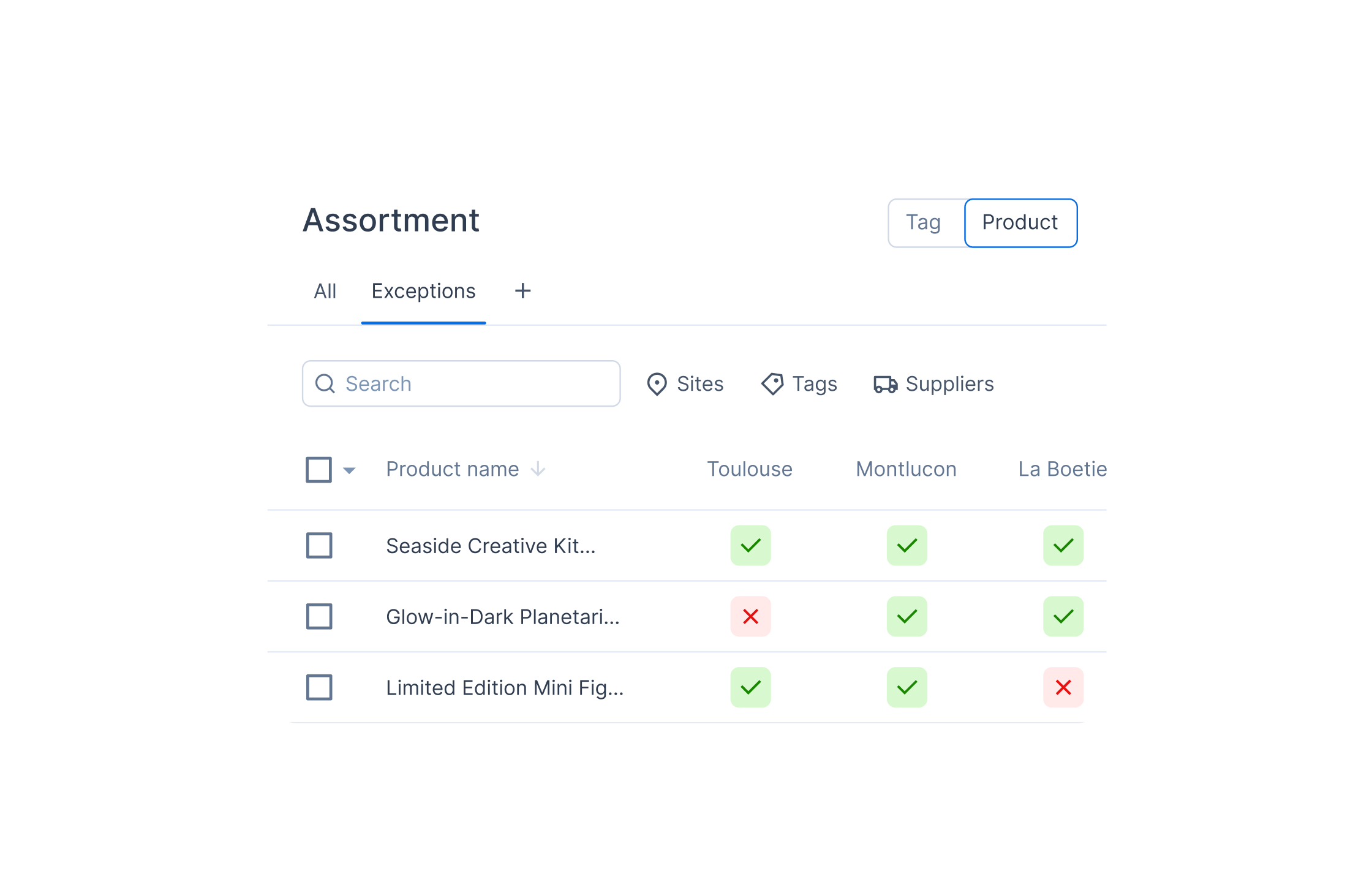
Two views, tag and product
Assortment that drives the orders
The range is not a document you file, it is the rule your replenishment follows.
.svg)
Order only what a store sells
.svg)
Replenishment you can explain
.svg)
Ranges that follow your stores
Keep assortment management in one place
One shared source of truth, not a folder of spreadsheets nobody trusts.
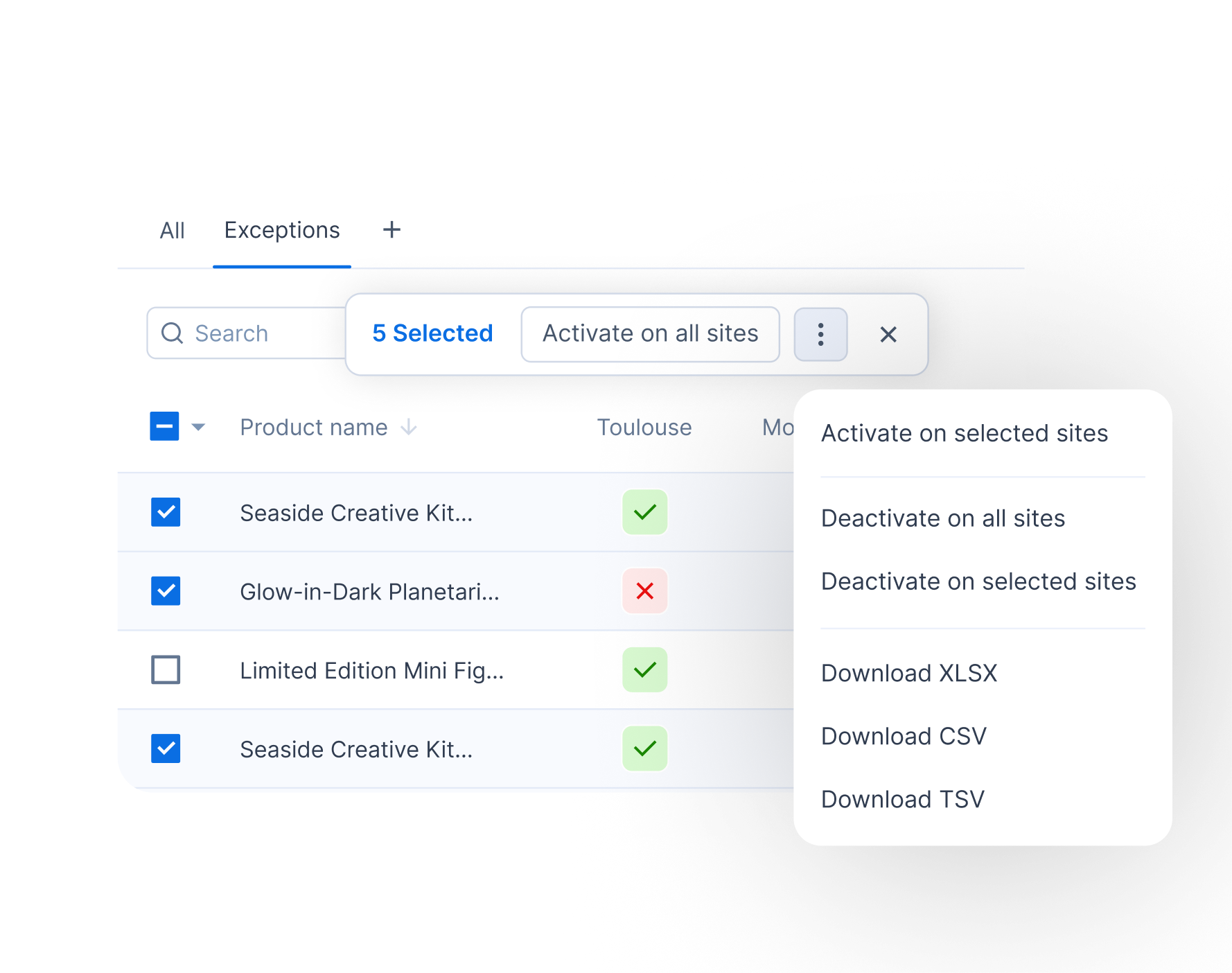
Exceptions tracked, not lost
Built for scale
From spreadsheets to software


Smarter assortment planning starts with replenishment
Why managing store assortment in spreadsheets holds you back

When your store assortment lives in Excel, it drifts from the system that actually places orders. Teams lose track of which file is current, updates are not shared, and the range is a static grid nobody can act on quickly.
At scale it gets worse: a network with dozens of stores and hundreds of product families holds thousands of store and family combinations, impossible to review by hand.
The cost then shows up on both sides:
- Products a store should not carry keep landing in its orders, and turn into markdowns.
- Real gaps stay invisible: the range drifts from what each store's customers actually buy, so you leave sales on the table.
It is the same firefighting that retail supply chains hit when planning is disconnected. Assortment planning software fixes it at the source, turning the spreadsheet into one shared, live model that both defines the range and controls what can be ordered.
Who Flowlity assortment planning is built for
Flowlity is built for multi-store retailers and distributors that carry many references across store formats of different sizes. It becomes relevant as soon as you run two or more stores with different product portfolios.
The people who use it vary, so the buyer may sit in product or category management, not only in Supply Chain:
- supply planners keeping orders clean,
- product or category managers owning the range,
- a dedicated assortment manager at larger retailers.
The clearest triggers to look at it now:
- replacing a legacy tool where the assortment lives outside planning,
- onboarding a new store format that needs its own range,
- responding to a purchasing tender (a request for proposal, or RFP) where assortment management is a stated requirement.
It is the strongest fit when your stores fall into tiers, when a real share of order lines are products that should not be in a given store, or when no one can explain why a reference is or is not replenished. A single location with a stable range does not need it yet.
Assortment sits inside Flowlity's retail inventory management software, alongside forecasting and replenishment, and retailers that get the range right can add 2 to 4% in sales through a more customer-centric product portfolio (McKinsey).
What to look for in assortment planning software
Judge tools on three things: how they handle scale, how they govern exceptions, and how far the decision travels.
Scale. As your store network grows, you want typology or tier based management, so you change a whole group of stores in one action instead of editing thousands of rows. Bulk actions across many families, filtering by site, tag category or typology from the column headers, and saved custom views keep recurring reviews to seconds.
Exceptions. A clear place to activate or deactivate specific products per site, on all sites or a selection, with every override kept in a dedicated tab you can audit. Plus flexible tag logic that combines categories with and/or conditions to build precise selections.
Integration. Product and tag lists that export to Excel or CSV, and a tool that connects to your ERP.
The decisive criterion, though, is whether assortment connects to replenishment. Many tools only visualise the range; the ones worth buying enforce it, excluding out-of-range products from order proposals and keeping the assortment rule attached to every order.
How Flowlity turns your assortment into orders
This is where Flowlity differs from merchandising-first suites. Flowlity does the store-level side of assortment: you decide which existing products are active in which stores, and that decision becomes an input to the order rather than a document planners consult.
You set a typology for each store and product family, and the matching products activate or deactivate automatically across the stores that match. You work from two views:
- a tag view, families across all stores in a matrix,
- a product view, reference by reference, with an active or inactive indicator per store.
Real ranges are never perfectly regular, so products outside the standard matrix, for example an item that should only sell in stores near the coast, are switched on manually for the sites you choose and recorded as exceptions.
From there the range drives store replenishment directly: products that are not active in a store are excluded from that store's order proposals.
Because assortment and Flowlity's AI-driven planning run on the same engine, a planner can tell whether a missing order is down to the assortment rather than the buffer.
Flowlity does not replace merchandise financial planning, open-to-buy or planograms. It makes the range you already decide actually control what gets ordered.
Assortment management that stays in sync with your planning
It is connected to demand forecasting, supply planning and replenishment, so the shelf plan and the orders never drift apart. When a store changes format, its range moves with its typology instead of a manual rewrite, bulk actions push a change across many families at once, and product and tag lists export when you need them elsewhere.
A range is only useful if it stays current and shared. In Flowlity the assortment is a single source of truth the whole team works from, not a file passed around by email.
Because the range and the orders share one system, a change to the assortment is reflected in the next order proposals straight away, with no re-keying between tools.
Getting started without a big implementation project
You do not need a perfect dataset to start. Flowlity works from data you already have:
- your store and product hierarchies,
- the typologies you already reason with,
- the sales, inventory and order data that already feeds replenishment.
A practical path is to define the tiers first (a basic, medium and large range per family), let products activate against them, then layer in the exceptions and refine as you learn, rather than freezing the business for a multi-quarter rollout.
Because the range and the orders share one system, the benefit shows up early: the first time out-of-range products stop appearing in a store's proposals.
FAQ
Find everything you need to know right here.
How does Flowlity assortment planning software work?
You assign a typology, for example basic, medium or large, to each store for a product family, and the matching products activate automatically in the stores that match, with bulk actions to apply a typology across many families at once.
You manage this from two views:
- a tag view, families across all stores in a matrix with a typology selector,
- a product view, reference by reference, with an active or inactive indicator per store.
Filtering by site, tag category or typology, saved custom views, and a hover preview of the products behind a family keep large catalogs reviewable. The active range then feeds replenishment directly, so a store only receives order proposals for products it actually carries.
Can Flowlity stop out-of-range products from being ordered?
Yes, that is the core of the feature. Products that are not active in a store's assortment are excluded from that store's order proposals, so buyers stop seeing and correcting lines that should never have appeared.
When a product is intentionally outside the standard matrix, you switch it on for the sites you choose as an exception, and every override is kept in a dedicated exceptions tab you can review.
Because assortment and replenishment share one engine, the assortment rule stays attached to the order, so a planner can see whether a reference is missing because it is out of range rather than because of a buffer or a supplier issue.
How is Flowlity different from a merchandise planning or assortment optimization suite?
Enterprise merchandising suites focus on building the range: option counts, merchandise financial planning, open-to-buy, demand-driven store clustering and planogram optimization. Flowlity focuses on the store-level side, which existing products are active in which stores, and on making that range drive replenishment. It is lighter, faster to deploy and aimed at mid-market retailers and distributors rather than at enterprise merchandising teams.
If your priority is a full pre-season financial and space planning suite, those tools go deeper. If your priority is that the range you decide actually controls the orders, without a heavy implementation, that is exactly where Flowlity is strong.
Does Flowlity replace our assortment spreadsheets?
That is the point. Flowlity becomes the single, shared source of truth for which products are active in which stores, so you stop chasing the latest version of a file or wondering whether every stakeholder sees the same one.
Changes are made in the app, in bulk when needed, and tracked, while product and tag lists still export to Excel or CSV when you need them elsewhere.
The difference from a spreadsheet is not just where the data lives, it is that the range is now connected to planning and controls what can be ordered.
How does Flowlity handle exceptions and products outside the standard range?
Real assortments always have exceptions, and Flowlity treats them as first-class rather than as edits that get lost. A product that sits outside the typology matrix, for instance a seasonal item or one that only sells in certain locations such as stores near lakes or the coast, is activated manually on the exact sites you choose. Those manual activations and deactivations, whether on all sites or a selection, are recorded in a dedicated exceptions tab, so anyone can see what was overridden. Combined with tag filters that support and/or logic, this lets you build precise selections without breaking the underlying tier model.
Which companies get the most from Flowlity assortment planning?
Retailers and distributors running at least two stores with different product portfolios, especially those managing many references across store formats of different sizes and currently juggling assortment in spreadsheets or a disconnected legacy tool.
The value grows with the number of stores and the size of the catalog, because that is where manual store-by-store management breaks down and where excluding out-of-range products from orders saves the most time and cash. Retailers whose stores already fall into recognizable tiers see value fastest, since the typology model maps directly onto how they think.
What data do you need, and how fast can it go live?
The core inputs are:
- a store hierarchy with the tiers you want to manage,
- a product hierarchy of families and references,
- the sales, inventory and order data that already feeds replenishment.
You do not need a perfect dataset on day one: define the tiers, let products activate against them, then refine typologies and exceptions as you go. Because assortment plugs into planning you already run rather than a separate system, teams stand it up fast rather than through a multi-quarter transformation project. In practice, Plum Living went live on Flowlity Core in around three months, and Jolimoi was up and running on Flowlity Lite, the plug-and-play tier, in a few weeks.